TetraSpot
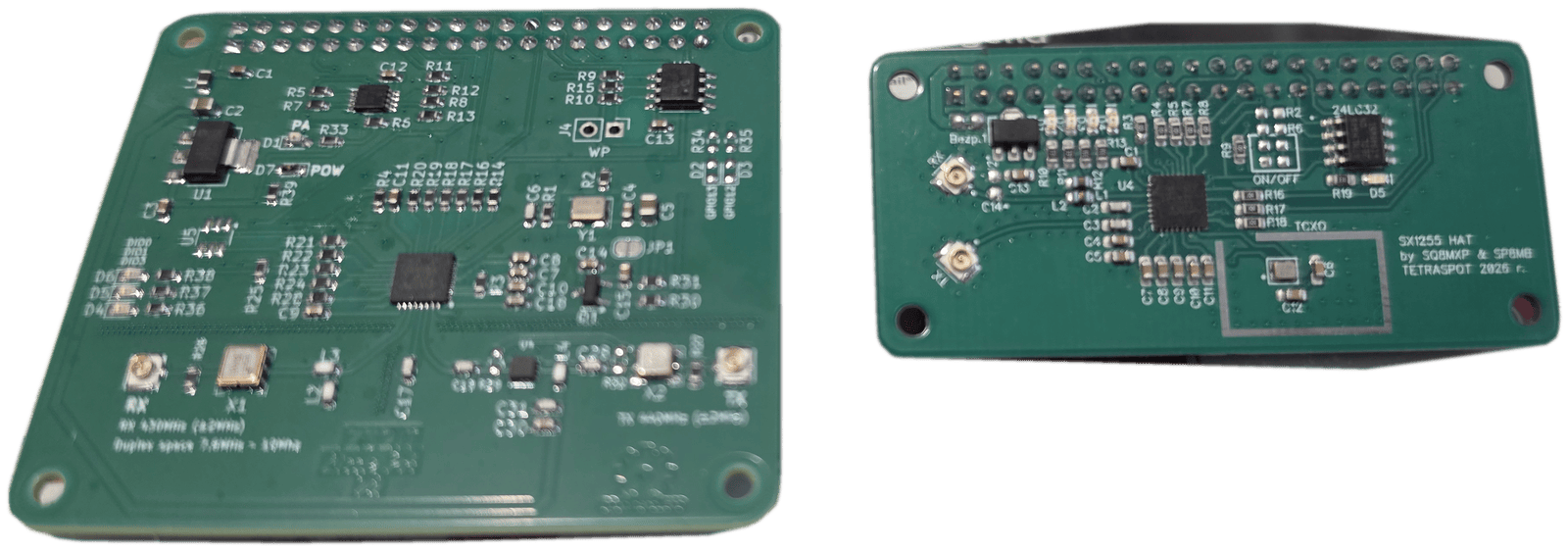
A TETRA hotspot the size of a small box: a Raspberry Pi 5 with an SDR radio that turns your home into a full station of the network. The same stack runs in two power profiles — from a quiet hotspot on a desk to a full BTS with built-in SwMI and a rooftop antenna, the first of its kind in the Polish amateur network. You drive the whole station from a browser: no config files to edit, no SSH needed.
In brief
- What it is
- A TETRA base station (TETRA hotspot) — the full protocol stack on your own hardware
- Hardware
- Raspberry Pi 5 (or an x86-64 machine) with an SDR radio board
- Supported SDR chips
- SX1255, AD9363, AD9361
- Band
- 430–440 MHz (70 cm), 10 MHz duplex spacing
- Variants
- HotSpot 100 mW for the desk · BTS 10 W with a duplexer and a rooftop antenna
- Configuration
- Web panel in a browser — no configuration files, no SSH
- Network
- TetraPoland hub (talkgroups 10–90) and BrandMeister (talkgroups 91 and above)
- Cost of a set
- Around 1300 zł including a second-hand TETRA radio
Two power profiles
The same software stack runs in both variants — only the transmit chain differs. Most people start with the hotspot on a desk and add the rest once they need real coverage.
HotSpot
- SDR: TetraSpot 1.0 · PlutoSDR · USRP
- 70 cm whip antenna
- No duplexer, no power amplifier
- For testing, the desk and short range
BTS
- 430–440 MHz duplexer + band-pass filters
- Driver + 10 W power amplifier
- Rooftop antenna — real coverage
- A full TETRA BTS with built-in SwMI
Operating manual
The complete station manual is on this site — fifteen chapters with screenshots from a live station, from the first login to the panel through to troubleshooting. Read it in the browser or take the printable PDF.
- Connecting to the TetraPoland hub and to BrandMeister — field by field
- The talkgroup split and where each call goes
- The TMO tab: network identity, frequencies, second carrier, calibration
- Terminal authorisation, packet data and the WAP portal on the radio
- SIP telephony and the GSM modem, the map and the APRS gateway
- Troubleshooting — with a chapter of its own on power and throttling
Features
The list below is the same single project status shown on the catalogue card — including what is still in development.
Features
- Full BS radio stack: PHY → LMAC → UMAC → LLC → MLE → MM/CMCE/SNDCP
- π/4-DQPSK modulation/demodulation (USRP, LimeSDR, LimeSDR Mini, sxceiver)
- SYNC/SYSINFO broadcast — network visible as a valid TETRA network
- Terminal registration (MM Location Update) and group attachment
- Group voice calls — our own ACELP codec implementation per the ETSI specification
- Individual P2P calls (half-duplex and full-duplex)
- Floor control for half-duplex calls
- SDS messages — individual and group, send, receive, store & forward
- Private-call relay between apps — the hub brokers the call setup
- GPS/LIP location — terminal position tracking
- Packet data — the radio gets an IP address and reaches the internet through the station
- WAP portal on the radio — the handset’s own browser opens pages served by the station: cell status, call log with callsigns, SDS log and the list of attached radios
- Voice takes precedence over data — a call reclaims the packet-data timeslot, and a dormant radio is woken when data arrives for it
- Dual carrier — more simultaneous calls from one station, with the data channel on its own carrier
- APRS bridge — radio and station positions reach APRS maps, with callsigns mapped to radio numbers
- Optional TEA1 authentication with whitelist
- OTAR key distribution (Over-The-Air Rekeying) — SCK/CCK/GCK
- Dynamic group assignment (DGNA)
- Sign in to the network with BrandMeister credentials
- Integration with TetraPack via the TetraPoland hub
- TetraPoland hub: floor arbitration, dashboard accounts, event log and live updates
- TetraPoland apps for Android and iOS recognized in the hub — with each client’s version
- Hub admin console: talk straight from the browser onto the air, listen in on a chosen source (group, station or app), record calls and ban stations
- Remote station control over SDS — a status or a text message (restart, reboot, power off), with delivery acknowledgement
- Echo (parrot) service — call in and hear yourself, to check network access and audio quality
- SIP/PABX telephony gateway
- GSM cellular gateway — an SMS from the mobile network reaches the radio as SDS and back
- Call barring and calling-line identity restriction (CLIR) — emergency calls exempt
- Web management panel (dashboard, call logs, configuration) over HTTPS
- Panel: timeslot occupancy view, power telemetry, transmit-path calibration and system logs straight from the browser
- Radio codeplug management from the panel — read and write over USB, offline .cpe handling (no CPS, no Windows)
- Optional supplementary services: a talking clock and street-name display on the radio (from its GPS position)
- DMR ID database with callsign lookup
- Ready-made SD card image — the station is personalized from a questionnaire (callsign, frequencies, talkgroups) and works after the first boot
- Online wizard that issues the image — invite code, generation queue and automatic enrolment of the station into the network
- Automatic fleet updates — every release is digitally signed and a station rejects an update without a valid signature
- The talker’s name on the radio’s display during a group call — checked with Motorola MXP600 and MTP radios
- Priorities and pre-emption — a private call can interrupt the group call its callee is sitting in, and a busy callee gives the caller a “called party busy” signal instead of a lost call
- Radio position on demand (LIP) — the station asks the radio where it is and the answer lands on the map
- Audio stream to a talkgroup — an optional module that plays a broadcast from an internet address to a chosen talkgroup, with priority
- Encryption key management from the hub for the whole fleet of stations, including staged rotation of group keys without interrupting service — checked on the air
- Hub: its own app accounts independent of BrandMeister, invitation codes for clients from outside the network, and binding each station to its own board — an SD card copied to another computer is rejected
- Panel: CPU temperature and load charts for a day, two days and a week, a full English version, separate client and technician profiles, SDR receiver calibrations as tiles
- Codeplug read and write for the Motorola MTP6650 as well
- Raspberry Pi 5 deployment with systemd services
In development
Architecture
  BS #1 (RPi5)    BS #2 (RPi5)    BS #N
  ┌──────────┐    ┌──────────┐    ┌─────┐
  │ PHY/LMAC │    │ PHY/LMAC │    │ ... │
  │ UMAC/LLC │    │ UMAC/LLC │    │     │
  │ MLE      │    │ MLE      │    │     │
  └────┬─────┘    └────┬─────┘    └──┬──┘
       │               │             │
       └───────────────┼─────────────┘
                       │ QUIC (bitcode)
          ┌────────────┴────────────┐
          │   SWITCH (DXT) :4433   │
          │   MM / CMCE / SNDCP    │
          │   Service Registry     │
          └────────────┬────────────┘
                       │
  ┌─────────┬────────┬───┼───┬──────────┬───────────┐
  │         │        │       │          │           │
Audio GW   SDS    Auth     LIP    Telephony  Management
(ACELP,   Server Server  Server     GW        Panel
 Brew/RTP) (REST) (TEA1/   (GPS)  (SIP/PABX)  :8080
                  OTAR)
Star topology with a central Switch (DXT). All microservices communicate via QUIC with bitcode serialization.
Frequently asked
What is TetraSpot (TETRA hotspot)?
TetraSpot, also known as a TETRA hotspot, is a full implementation of the TETRA protocol stack — a base station (BS) with microservice architecture. It supports group and individual voice calls (our own ACELP codec implementation per the ETSI specification), SDS messages, packet data (the radio gets an IP address and reaches the internet) with a WAP portal on the handset, GPS/LIP location, optional terminal authentication, key management, a SIP/PABX gateway and integration with the TetraPoland hub. It runs on one or two carriers (dual carrier). Deployed on a Raspberry Pi 5 with an SDR radio.
What is the difference between the HotSpot and the BTS?
Only the transmit chain — the software is identical. The HotSpot is 100 mW into a whip antenna, with no duplexer and no amplifier: enough for a desk, for testing and for short range. The BTS adds a 430–440 MHz duplexer with band-pass filters, a driver and a 10 W amplifier, plus a rooftop antenna — that is real coverage. In both cases the station is a full TETRA BTS with built-in SwMI.
What do I need to build my own station?
A Raspberry Pi 5 (2 GB RAM or more) with a High Endurance card, an SDR radio board, a power supply, active cooling, pigtails and antennas for 430–440 MHz, and an enclosure. The TMO HAT alone is around 350 zł, and the whole set including a second-hand TETRA radio usually lands around 1300 zł. The shopping list and step-by-step assembly are on the HowTo page.
Do I need an amateur radio licence?
Yes. TetraSpot is a transmitter working in the 430–440 MHz amateur band, so bringing it on air needs an operator certificate and a radio permit, and the station runs under your callsign. Without a licence you can build the hardware and listen, but not transmit.
Does the station need a permanent internet connection?
It does not, but without one it works on its own: radios will register and talk locally, yet they will not hear anyone on the other stations. Internet is what connects you to the TetraPoland hub, which ties the stations together, and to BrandMeister.
What radio do I need?
Any TETRA terminal that can be programmed for our network parameters in the 430–440 MHz band — the codeplug has to match on MCC, MNC, colour code and Location Area. In practice most people use Motorola handsets, because the station panel can also read their codeplug and identity over a USB cable.
Where do I get the software?
You do not install the stack separately — it rides inside a ready-made card image. You fill in the wizard at update.tetra-poland.pl, receive a personalised image and write it to the card. Later releases the station fetches by itself, and every one of them is digitally signed. For an invite code, get in touch with SP8MB.
Where is the operating manual?
On this site — the full panel manual lives at tetra-poland.pl/en/tetraspot-manual, in English and Polish, with screenshots from a live station. There is a printable PDF as well. File-based configuration and command-line work are covered by a separate advanced manual, which is not published here — ask for it.
The rest of the ecosystem
TetraSpot is the station. At the other end of the link stand the radios and the apps: TetraPoland for Android and iOS, Multi-Radio, an ATAK tactical-map plugin and network analyzers. All of it is described in the project catalogue.