Download TetraPoland
A software TETRA radio on your phone. Install it and connect to the TetraPoland network over mobile data or Wi-Fi — no hardware to buy. On Android it also runs on PoC radios: it supports the hardware PTT key and the group knob (including models we have never seen — you teach the app your own keys), and on hardware with no touchscreen you drive it from the keypad.
Works on any Android phone — recommended
Requires iOS 16.0 or newer · build 86
- Install TestFlight from the App Store — Apple’s official app for testing apps.
- Open the link above on your iPhone — it adds TetraPoland to TestFlight.
- If TestFlight asks for an invite code, enter YYPG2ZnR — it is the tail of the link.
A separate app for PoC radios without a touchscreen — driven entirely from the keys: the D-pad, the PTT trigger, the channel knob, Menu and Back. The same core as TetraPoland for phones, its own version series. Preliminary, for testing: login, talkgroups, duplex calls, contacts and the call log work; private simplex calls and SDS from the radio are still under test.
⬇ Download TetraPoland PoC (armeabi-v7a) · 5,5 MBPoC radios (Hytera P50) are 32-bit ARM — this is the file for them
Universal build (all architectures)⬇ 13,6 MB- Enable USB debugging on the radio (Settings → Developer options) and connect it to a computer with ADB installed.
- Install:
adb install -r tetrapoland-poc-armeabi-v7a.apk - Grant what cannot be switched on from the radio's keys (the app stays in front after the red key, the knob changes groups):
adb shell appops set pl.tetrapoland.poc SYSTEM_ALERT_WINDOW allow
adb shell pm grant pl.tetrapoland.poc android.permission.WRITE_SECURE_SETTINGS
adb shell settings put system knob_locked 0
- Start the app from the radio's launcher (the right "PoC" key) and enter your DMR ID and BrandMeister SELF CARE password in Menu → Settings → Network. The app finds and downloads later versions by itself, but the radio's firmware will not let it install them — a new file goes on the same way as the first one.
Key rules: a short centre press selects, holding opens the item's menu, ← goes back, in lists → / ← jump by 10.
PoC operating manual →Not sure what comes next?
The full manual walks you through it step by step — from the SELF CARE password and the first login to talkgroups, scanning, the map and background operation, for Android and iPhone in one document.
Screenshots
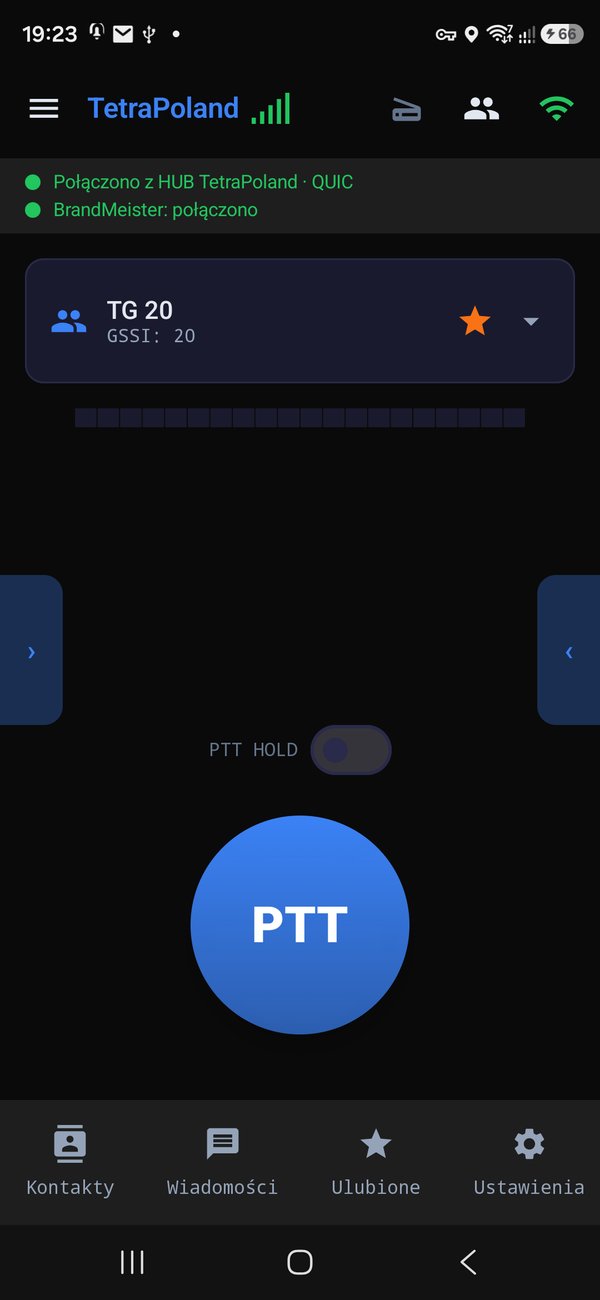
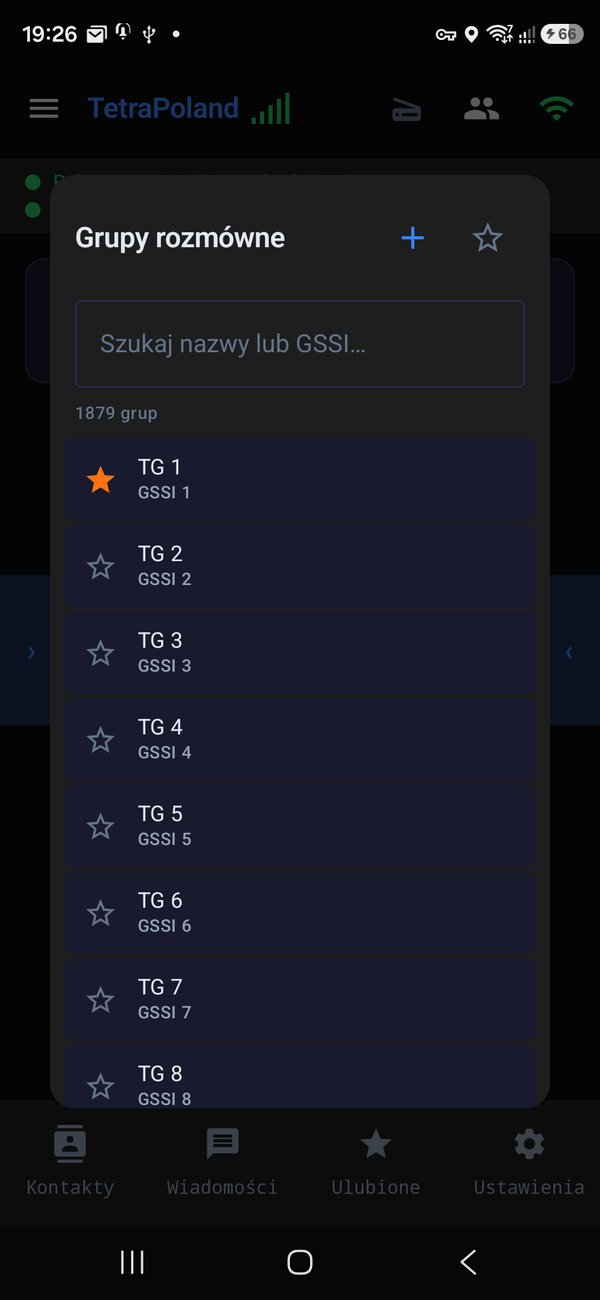
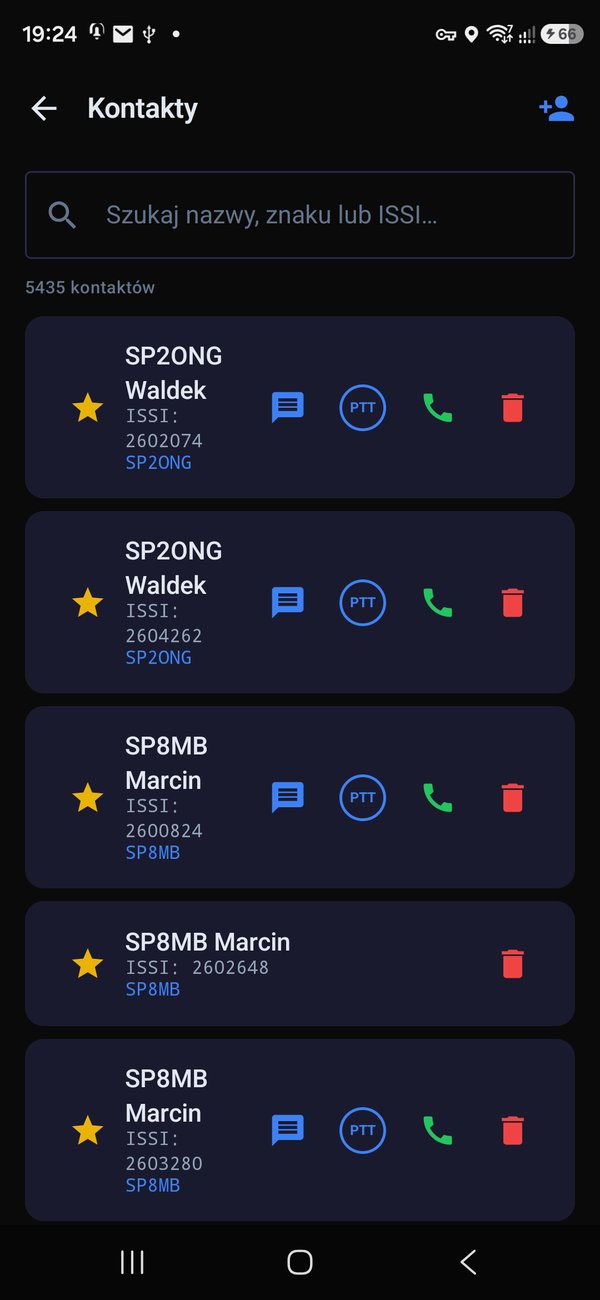
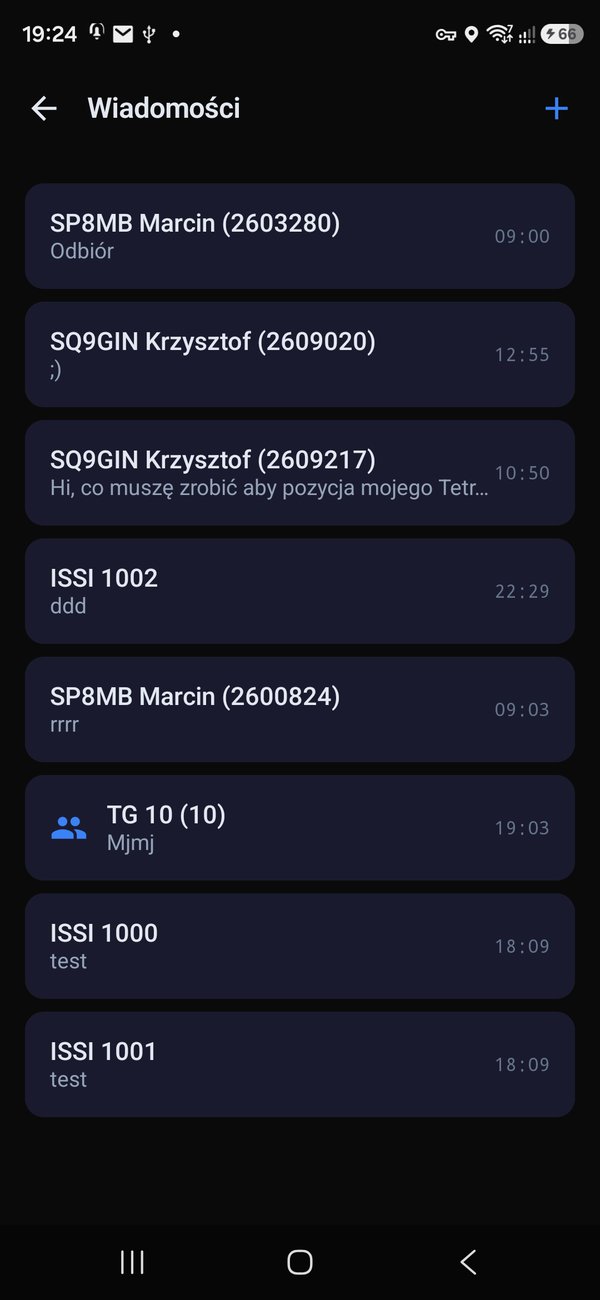
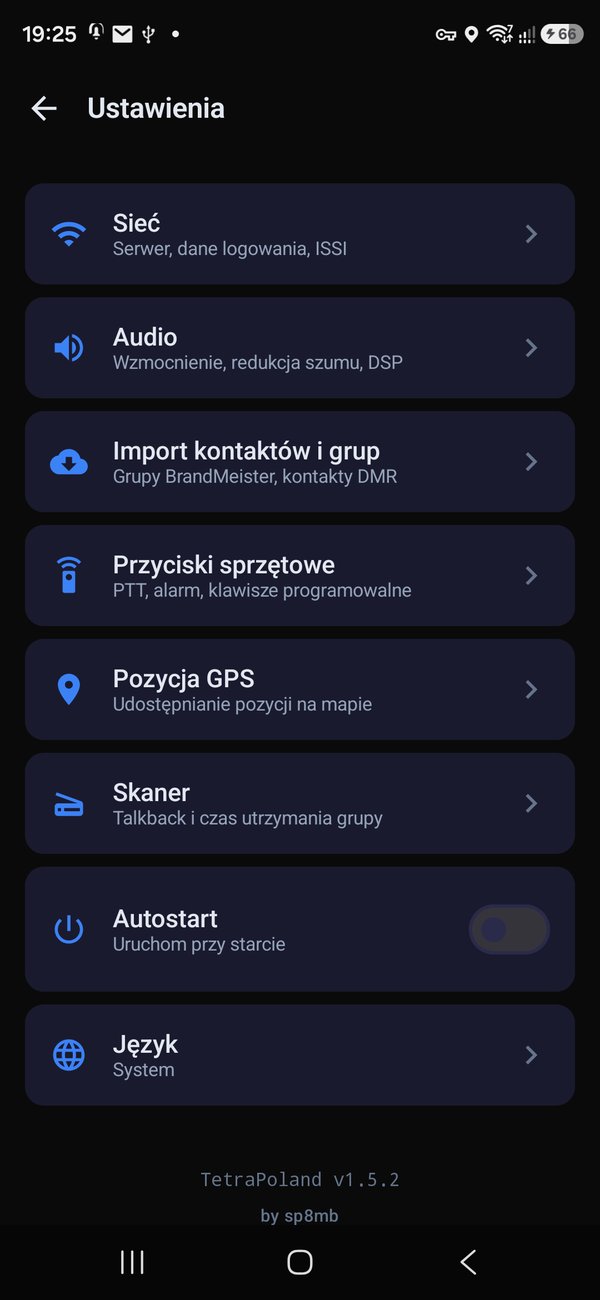
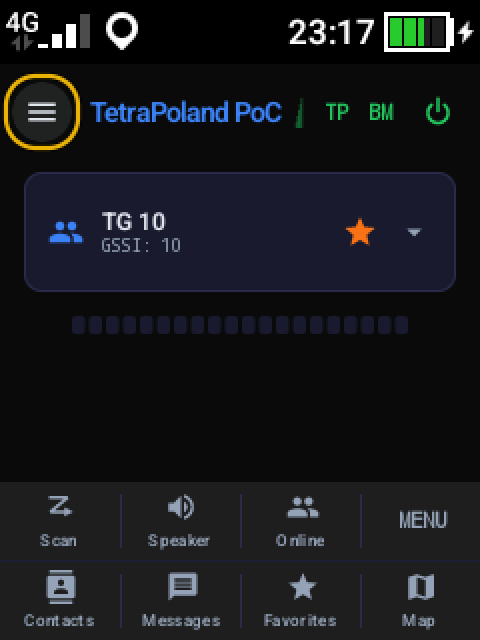
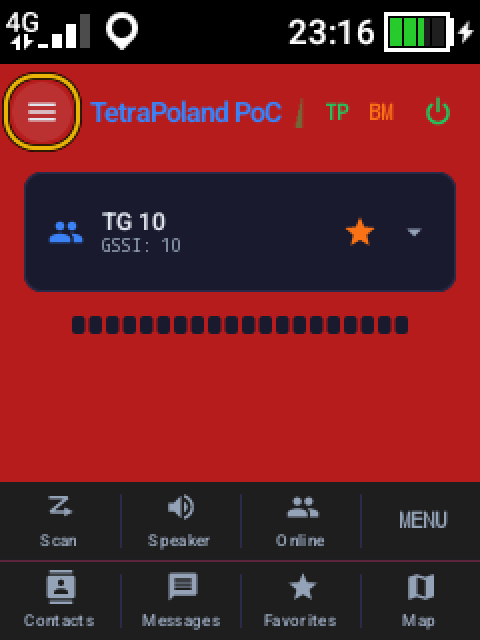
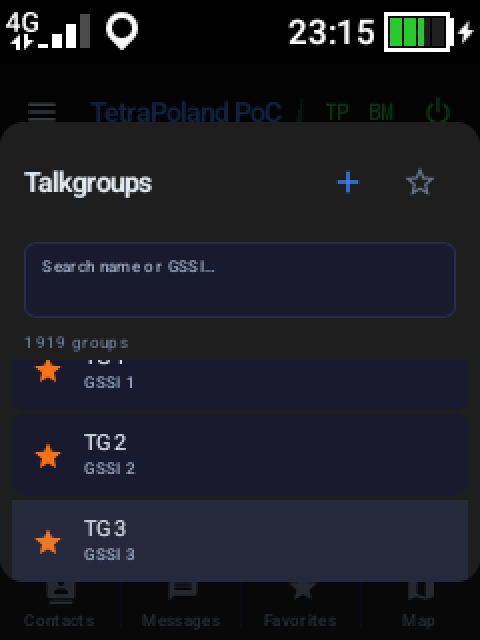
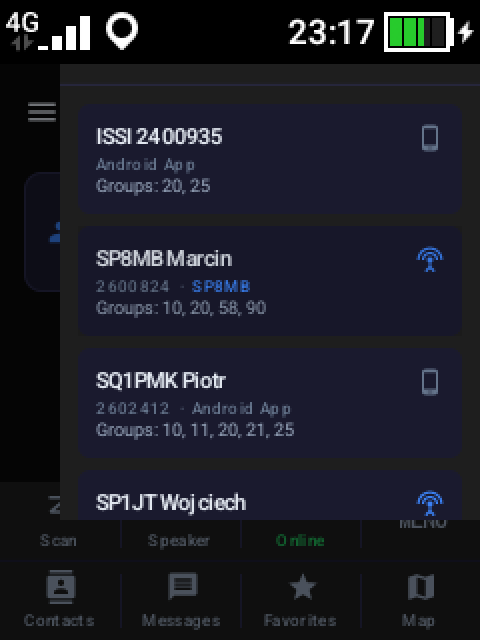
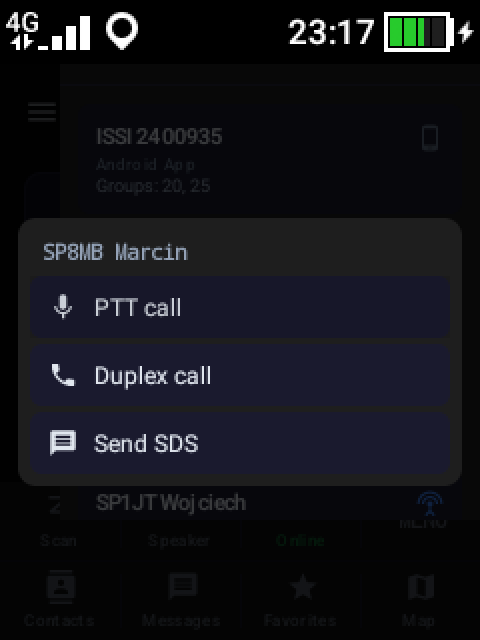
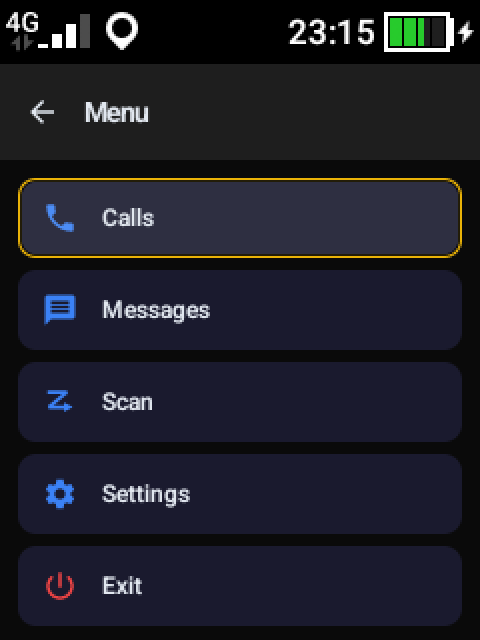
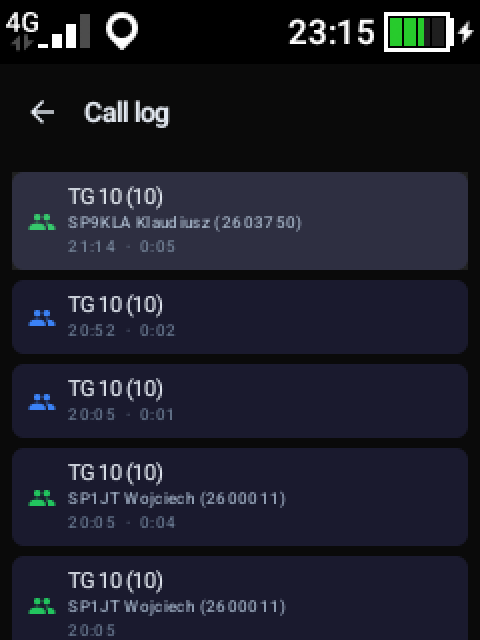
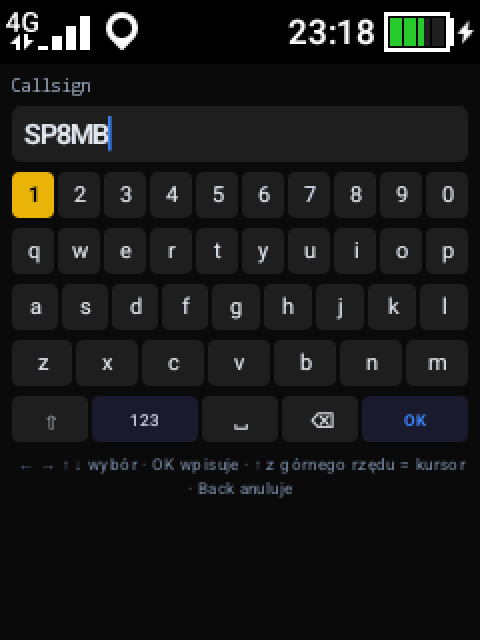
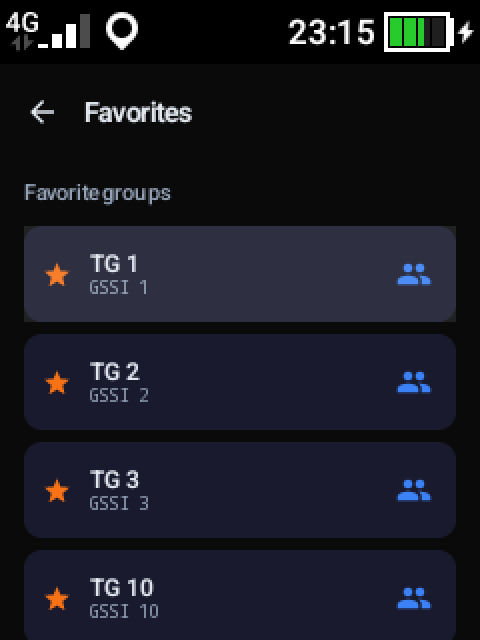
TetraPoland PoC on the Hytera P50 (240×320 screen, key-driven)
How to install
Android — the APK
iOS — TestFlight
What the app does
- ✓Group PTT calls (RX / TX) with floor control
- ✓Private calls — half- and full-duplex
- ✓Sign in with your BrandMeister network credentials
- ✓SDS messages — individual and group, with quick replies
- ✓Talkgroup scanning with hold and priority
- ✓GPS position reporting to the tetra-poland.pl map and track logging (GPX)
- ✓Bluetooth LE PTT buttons (PTT-Z01, AnyTone) and headset
- ✓Contact list and call history
Android — what's new
- v1.8.152026-09-27latest
- Faster recovery after a dropped link. When the connection to the server dies — usually on weak coverage or a network change — the app now retries immediately instead of waiting out a few seconds of backoff. It does not speed up noticing the drop itself: that is the server's idle window.
- Drop diagnostics. The app now records how long a connection lived and when it last carried traffic in each direction. From the server alone you cannot tell a phone whose data path died from one the system put to sleep — two different faults needing two different fixes.
- v1.8.142026-09-27
Voice from BrandMeister without the gibberish. The gateway bridges several conversations onto one talkgroup at once — on TG 91 two can start half a second apart. The app used to follow the talkgroup number alone, so all those voices went into one decoder interleaved and what came out of the speaker was gibberish. The app now sticks to a single conversation, and a parallel one takes over only once the followed one falls silent. While we were there: another station's call ending on our talkgroup no longer cuts us off mid-sentence. The same fix shipped alongside in the iPhone version.
- v1.8.132026-09-13
The app now identifies itself to BrandMeister in line with BrandMeister's guidelines. It announces the software name and version together with the standard Brew protocol headers. Nothing changes for the user — the BrandMeister link over TetraPoland works just as in the previous version.
- v1.8.122026-09-13
- BrandMeister over TetraPoland is UNBLOCKED. The link for talkgroups 91 and above works again and is on by default — all it needs is your SELF CARE password in the network settings. The switch is back next to the "TETRA — TetraPoland" network, so you can turn it off if you would rather reach BrandMeister only directly, on a master from the catalogue.
- Both routes to BrandMeister now work side by side — over TetraPoland and straight to the master of your choice. They share the same SELF CARE password.
- v1.8.112026-09-12
- Scanning now covers both networks at once. TetraPoland groups and BrandMeister groups run in a single scan with one priority list. Sitting on a hub group you will hear a scanned DMR group and the other way round — previously one of the networks stayed silent.
- Priorities work on DMR too. A higher-priority group interrupts a call in progress, and voice on the selected group takes precedence over scanned ones. Until now DMR went by first-come only and a call held the speaker to the end.
- Marking a group for scanning from the main screen finally works. A group marked that way never received a priority and stayed silent even with scanning on. Groups marked before this update need to be unticked and ticked again once.
- The app transmits quieter. Its outgoing level ran about 6 dB above handheld radios, so correspondents heard it louder than everyone else. The level is still adjustable in the audio settings, and the slider now reaches lower.
- PTT on DMR keys up immediately. Signalling goes out the moment you press and no longer waits for the microphone; if the microphone is unavailable the transmission carries on instead of dying silently. When the system mutes the microphone, during a phone call for instance, the app says so.
- Private calls and the 9990 parrot are audible again. Reception now reads the call type, so a transmission addressed straight to us is no longer treated as a group and muted.
- BrandMeister is reached directly. The network list no longer carries the switch for the extra link over TetraPack. The SelfCare password stays where it was, as it serves the master login. A fresh install starts on a verified master.
- v1.8.102026-09-11
- Digital DMR and BrandMeister networks finished off. Received voice finally reaches the speaker, the indicators in the top bar show each link's own state, and the screen names whoever is talking. Calls from these networks now go into the call log and "Last heard" as well. Transmitting with the screen off no longer gets lost.
- Static BrandMeister talkgroups — as on a hotspot. Starred groups and those marked for scanning are held in parallel, so you hear several at once rather than only the selected one. Adding or removing a star takes effect immediately, without logging in again. Scanning now covers up to 20 groups in total.
- Mute incoming audio from the audio output menu — the voice meter still shows that someone is transmitting.
- Network selection lives under Settings → Network. The switch for the BrandMeister link over TetraPack sits next to "TETRA — TetraPoland"; the SelfCare password stays in the network settings, as it is shared by every route to BrandMeister.
- v1.8.62026-09-06
A cleaner way the app introduces itself to the gateway. To the hub and BrandMeister the app now sends one fixed identifier — a distinct one for the Android, iOS and PoC-radio builds. This lets the server recognise our app's traffic unambiguously and tell it apart from other programs using the same gateway. The app's name and the way you use it are unchanged.
- v1.8.52026-09-04
- No more probing of BrandMeister masters. The master catalogue used to check live which masters answer, sending each one an unauthenticated packet every time the screen opened — under one fixed DMR ID. To the BrandMeister gateway host that looked like a burst of password-less login attempts from many addresses at once, and it responded by blocking our users' addresses: the app stopped connecting to BrandMeister even with a correct password. The probe is gone entirely; the app no longer sends anything it does not sign with its own login. Which masters do not accept application connections is now shown from a list, without asking them.
- If BrandMeister still will not connect from your network after this update, the block may still be in place on the gateway side — it normally expires on its own; let us know if it does not.
- v1.8.42026-09-02
- HIROYASU HI-B10 works straight after installing. A new profile under Settings → Hardware buttons, switched on automatically on an HI-B10. The side PTT comes from the radio's system and works with the screen off as well. The top knob steps through favourite groups, the orange key on top is the alarm key (separate actions for a tap and a hold, as on the Hytera), and the two keys under the PTT set the receive volume — upper louder, lower quieter. The radio's firmware has ideas of its own about those keys: one switches the display off, another starts the camera. The app lights the display back up within a fraction of a second and puts itself back on top of the camera, so it may flash briefly. In the radio's own settings keep XIN_POC selected as the PTT app.
- Tidier "Other radio" profile. A PTT broadcast typed there now works only while that profile is selected — after switching to a built-in profile it no longer keys alongside it.
- v1.8.32026-09-01
- Five digital networks alongside TETRA. The app can now connect straight to amateur digital networks, with no hub in between — and TETRA works exactly as before. Added: BrandMeister (a catalogue of every master, with a green dot on the ones that answer), DMR Homebrew (XLX, FreeDMR, DMR+, HBlink, TGIF — over a thousand servers), YSF and FCS (Fusion), M17 and NXDN. Pick the network from the menu, the server from a searchable catalogue.
- Switching works like this: groups 1–90 always stay, because that is what the app is for. Above them the chosen network decides — move to YSF, FCS, M17 or NXDN and the BrandMeister groups give way to that network's rooms, starred in the catalogue. A room is picked exactly like a group.
- Two things said plainly: transmit on YSF, FCS and M17 builds correct frames, but nobody has tried it on the air yet — the first transmission will also be the first test. And NXDN only connects and shows traffic, without sound: over a quarter of an hour listening on six reflectors nobody spoke, so there was nothing to take apart.
- Clearer transmitted audio. Three faults in the vocoder, each audible: the pitch could jump by an octave (heard as a crunch), fricatives — s, sh, f — were taken for voiced sounds (a crackle on peaks), and the decoder's gain was too low. Fixed, and confirmed by ear.
- The screen now fits the display (new, in trial). On small screens — the touch PoC radios among them — parts of the app simply did not fit: the panel naming the station on air vanished entirely, and on a call screen even the red hang-up button could fall off the bottom. Everything had been measured for a phone. The new layout works from the size of the display: buttons and type shrink, on the smallest screens the bottom tab bar moves into MENU, and the talker panel always keeps its place. Switch it on in Settings → Responsive layout (beta) — on a phone the difference is slight, on a small screen it is the difference between usable and not. Please try it and tell us how it goes; it is meant to replace the current layout.
- Your position on the map no longer jumps across the world. With no satellites in view, Android can answer with a position from its Wi-Fi database — and an access point carried to the other side of the world still reports where it was first mapped. On the map this looked like every second point landing in Karachi, Riga, or simply the middle of Poland, with the track line crossing continents. The app now refuses positions nothing could have travelled to, and while GPS is working it does not send network positions at all. Genuine travel — a flight included — is accepted normally after a few minutes.
- v1.8.22026-08-26
Group 91 (BM World) no longer sneaks into scanning on its own. A fresh install got groups 91–100 with scanning switched on, while the scan screen lists favourites only — so the group kept talking and there was nowhere to switch it off. New installs start without it, and existing ones tidy their scan list at the next launch: only a favourite group can be scanned, i.e. one that shows on the scan screen and can be unticked.
- v1.8.12026-08-25
- You can finally see who is talking. The transmitting station's name was a single small line squeezed between the group tile and the level meter — the most important thing on the screen, written in nearly the smallest type on it. It now fills the space between the group and the transmit button, and the text sizes itself to its length: a callsign is readable across a room, a longer name steps down to fit instead of being cut off. The ISSI sits underneath.
- While transmitting the panel turns red and names the group you are on. One glance tells you that you are on air and where the audio is going. When you answer inside the post-scan window, it names the group you just heard — because that is where the transmission goes, not the group selected in the tile.
- With nothing on air the panel shows a dimmed "Last heard" with the most recent station and group, instead of sitting empty.
- v1.8.02026-08-25
- The home screen now matches the radio app. A row of four buttons sits above the bottom bar: Scan (tap toggles it, hold opens the scan screen), speaker / earpiece / Bluetooth (tap cycles, hold shows the list), Online (who is logged in) and MENU. Scan and the user list are therefore gone from the top bar, and the audio-output chips from under the transmit button — which lifts PTT itself into easier reach of your thumb. The top right now carries two letters, TP and BM: green when logged in, orange while connecting, red when the network is gone. They replace the two lines of connection status, leaving more room for what matters.
- Transmission no longer clips when you release the button quickly. The last syllable could be cut off when the finger left the button faster than the audio could get out. The release now waits a moment, and if the finger comes back within it the transmission simply continues instead of breaking into two overs.
- Mute a single group while scanning. When the scanner catches a conversation, the button on the group tile now mutes that one group until scanning is switched on again — it used to switch the whole scanner off, leaving you to start it over.
- The call log has a place of its own. The tab on the left edge of the screen opens it; it is gone from MENU, where every new conversation pushed it further down.
- v1.7.92026-08-24
- DMR ID verification no longer stalls on the password. The Verify button demanded the SELF CARE password too — a field verification never uses, sitting further down the screen. Anyone who typed their callsign and number faced a dead button hinting "enter callsign and ISSI". Verify now needs only what it uses, the hints name the actually missing field, and a disabled Save says why it is grey. A suffixed callsign (e.g. /P) no longer trips the lookup either.
- The app no longer freezes when coverage drops. Releasing the transmit button just as the network died could freeze the whole app for many seconds — with Android offering to close it. Sending now waits in its own queue and never blocks the screen.
- Less choppy audio in weak coverage. Every piece of voice now carries a spare copy of the two before it — when a packet dies on the way, the receiver rebuilds the missing fragment from the copy instead of leaving a hole. On measured real mobile routes this removes most of the loss. Works once the server and app are updated; older versions interoperate unchanged.
- v1.7.82026-08-23
- The app vanished in the background on older Androids — fixed. On the Hytera PTC760 and other devices running Android 10 or older the app could disappear right after going to the background or when the screen went off — the link to the server dropped and never came back until the app was opened by hand. Position reporting was to blame: every change of GPS receiver state (exactly what happens when the screen goes off and the radio loses its fix) killed the app, the system restarted it, it died again two seconds later, and after the second try the system stopped bringing it back. Newer phones sidestepped the bug. The app now takes those events in its stride and stays in the background as it should.
- A hardware PTT answers an incoming call. When someone calls you privately, just press PTT — no need to reach for a button on the screen. On a phone-style (duplex) call PTT answers it; on a normal (simplex) one it answers and starts transmitting straight away.
- The alarm key is yours to set. On radios whose SOS key has no channel or contact assigned you can now choose what it does (Settings → Hardware buttons → Alarm key): by default a short press turns scanning on and off, and a long press sends a message you prepared to a chosen favourite contact.
- Updating despite the manufacturer's lock. Some radios do not let an app install its own update. Instead of an error, the system installer now opens with the file already downloaded — just confirm.
- v1.7.72026-08-22
- The Hytera P50 now works from its keys. On the Hytera P50 PoC radio (no touchscreen) the app picks the right button profile by itself: the PTT trigger transmits, the top knob steps through your favourite groups, and the orange alarm key can be assigned to a group — it transmits there for as long as you hold it. All of it works with the screen off and from the radio's home screen, because the keys arrive straight from the radio's system. The side key under PTT acts as P1 once you give it the "PoC custom" function in the radio's Settings (Programmable keys). The radio also shows the connection and call state on its own home screen and opens TetraPoland from the left key.
- Alarm key on other radios. On the Motorola EVOLVE and Hytera PTC/PNC the SOS key, unused until now, can be assigned to a group or contact the same way (Settings → Hardware buttons → Mapping).
- Radios without a touchscreen get a home screen without the on-screen PTT button and without the drawer edge tabs — they cannot be used from keys and only got in the way of navigation (nothing changes on a phone). Instead, a row reachable with the arrow keys sits above the bottom bar: Scan (short press = on/off, hold = scan screen), users (who is logged in) and MENU (Calls, Messages, Scan, Settings, Exit — all from the keys). The selected control now has a clear yellow frame, visible on the speaker and handset buttons too, and the Back key on the home screen no longer closes the app. Also fixed: the app closing itself when a hardware PTT was pressed before it had connected.
- Position on aprs.fi too. With map position reporting on, the same position also goes to the APRS-IS network (aprs.fi) — just a callsign, the app computes the passcode itself (Settings → GPS → APRS; can be switched off).
- Home-screen widget: link state, the selected talkgroup and previous/next favourite buttons; a tap opens the app.
- v1.7.62026-08-21
DMR ID verification works again on older radios and phones. On the Hytera PTC760, HIROYASU and other older Androids the "Verify" button next to the DMR ID returned an error — the app couldn't reach the radioid.net database because those systems don't know one of the newer security certificates. The missing certificate is now bundled with the app, so verification and contact import from radioid.net go through again, just like on newer phones.
- v1.7.52026-08-21
Fixes for Hytera radios (PTC760 and similar). The PTT trigger worked in reverse — transmission started after the button was released instead of while it was held. The radio now transmits exactly as long as you hold the trigger. Group audio also defaulted to the quiet top receiver instead of the big front speaker — on Hytera radios reception now plays through the front speaker, as it should. Duplex (phone-style) calls still play at the ear.
- v1.7.42026-08-16
- No more position scatter on the map. The app listens for positions from both GPS and the mobile network — and a cell-tower reading can be off by hundreds of metres, yet went to the map like any other, corrupting the distance trigger for the reports after it. Readings with accuracy worse than 100 m are now rejected — in the GPX track too.
- A position counts as sent only when it actually left. When the hub link happened to be down (during a reconnect, say), the app could mark a position as sent although it never arrived — then go quiet for the full reporting interval, up to an hour. A failed send now retries on the next reading.
- v1.7.32026-08-16
- Private calls now reach radios too. In the "Users online" list the call button used to appear only next to app users — radios had none. Every entry now carries both buttons: a PTT (simplex) call and a phone-style (duplex) one, whether the other side is a phone running the app or a radio on a site.
- A question before the call goes out. The call buttons next to contacts, favourites and online users now ask "Really place this call?" and say plainly which kind it is: duplex rings like an ordinary phone and both sides talk at once; simplex is a PTT conversation, one side at a time. A stray touch while scrolling a list no longer rings anyone's radio. The iPhone app gets both changes in the same release.
- v1.7.22026-08-11
- A Galaxy Watch app. The watch works as a remote: transmit from your wrist, switch between favourite talkgroups and see who is speaking without taking the phone out. Audio can optionally move to the watch as well — receive, transmit or both. Note: the watch support ships as it stands — transmitting and receiving from the wrist have not yet been confirmed by listening, so treat that part as still to be proven in the field.
- PoC radios: teach it your buttons instead of waiting for a profile. Until now the buttons only worked on models written into the code — every new radio meant a report to us and a new version of the app. Settings → Hardware buttons now has an "Other radio" profile: tap a row, press the key on the radio, and the app remembers it. Three functions can be taught — PTT and both channel steps, which covers the group knob most PoC radios are built around. For hardware that sends a software signal instead of a key press there is a separate field for its name; the release signal is derived automatically. The standard PTT signals used by some radios and by key-bridging apps are recognised too.
- The radio's own display follows the call. On radios with their own status screen and LED the app can now hand them the talkgroup name, the speaker and the transmit state — until now the hardware insisted nothing was happening while a call was in progress. A switch in Settings → Hardware buttons, off by default, as an ordinary phone has nobody listening.
- Usable without a touchscreen. Some PoC radios have no touch at all — a keypad and a knob. The selected control now has a visible ring and the centre key activates it; on such hardware the selection starts on PTT, so the first press transmits.
- Three switches for working from a radio. The screen may be allowed to sleep (it used to stay lit whenever the app was up front — on a radio in a pocket that is current spent for nothing). The on-screen PTT button can be hidden when the hardware has its own. Pressing the hardware PTT can wake the screen and raise the app, so you can see that you are transmitting.
- Background work finally visible. Settings gained a row showing whether the app is allowed to run without battery restrictions — without it the system suspends the app after half a minute or so and the session drops. One tap takes you to the right place in the system. The permission itself is now asked for once rather than on every launch. The background keepalive is steadier too: the alarm that guards the session is now an exact one rather than "some time later", because Android could stretch a five-minute interval to nine minutes and more.
- The English build is complete. A few places spoke Polish regardless of the language setting.
- v1.7.12026-08-02
- The app uses less battery when nothing is happening. A review of what it does in the background turned up several things running around the clock for no reason. The audio level meter was read six times a second even with the screen off, when nobody can see it — it now runs at full rate only while you are transmitting or receiving. The alarm that keeps the connection alive woke the phone every thirty seconds although its real work comes round once every five minutes; it now wakes when it has something to do, and copes better with Android's power saving as a side effect. The voice sending loop could, in one particular case, keep running after a transmission ended and carry on until the app was restarted — it now stops by itself. WiFi low-latency mode, which switches the adapter's power saving off, is taken for the duration of a call instead of permanently. Searching for a Bluetooth PTT button ran at full power indefinitely when the button was switched off — after half a minute it now drops to a low-power search. None of this changes how the app behaves; it changes how much current is spent waiting for a call.
- The map replaces Settings on the bottom bar. On the bar you reach with a thumb while working, a map is worth more than a screen you set up once. Settings have not gone anywhere — they are in the menu under the three lines, as before. The map opens inside the app rather than in the browser: switching to the browser puts the radio in the background, and you would have to switch back before you could transmit. The iPhone app does the same.
- v1.7.02026-07-31
- A private call now survives a change of network. When the phone hops from WiFi to mobile data — leaving the house, driving out of the garage — the link to the server drops and is rebuilt. That usually takes a fraction of a second, but until now a private call ended right there, and the other side was never told: they were left holding a dead phone. The call now waits for the network to come back and carries on. If it does not come back, the call ends by itself and — this is new — the server tells the other party, including when the other party is a radio.
- A phone-style call no longer hangs forever when the other side disappears. If not a second of audio arrives for twenty seconds — their phone died, or they closed the app — the call hangs up on its own. PTT calls have had that safeguard for a long time; phone-style calls had none.
- The green handset next to iPhone users. In the "Users online" list, people using the app on an iPhone had no call button and were shown as radios. You could of course call them — just not from that list. They now get the handset and the phone icon like everyone else.
- v1.6.92026-07-30
- A BrandMeister login is now required — for some people this needs action. The app now signs in everywhere with your DMR ID and SELF CARE password: to the Polish hub as much as to BrandMeister. Anyone who used to connect with just a callsign and the shared password will, after updating, see "Enter your DMR ID and SELF CARE password in Network settings" and will not connect until they do. The reason is not paperwork: under the old login the server had no way to confirm who you really were and had to take the number the app claimed on trust. Your identity is now verified against BrandMeister, and the number you present on the network has to match it. The SELF CARE password lives at brandmeister.network → SelfCare → Hotspot Security.
- You can finally see who is calling while the app is in the background. A private call — PTT or phone-style — now raises a proper call notification with the caller's name, and on a dark or locked screen it opens the app by itself. Before, a ringtone played and nothing said what was ringing or who to answer.
- Group calls get one quiet notification. A single entry, rewritten as things change, showing the active talkgroup and who is speaking. It never rings, never vibrates and never multiplies with each transmission.
- New icons for scan, and for logging in and out. Scan now uses the sign radios use — a "Z" with an arrow — instead of a flatbed-scanner glyph. The network login shows a power switch rather than a WiFi symbol, which suggested the state of the phone's internet rather than your registration on the TETRA network.
- PTT latch in private calls. The same switch as on group calls: PTT can be latched instead of held, and the choice is remembered between calls.
- Exit and Kill App moved above the call history — the history grows with every conversation, so those two kept drifting further down.
- v1.6.82026-07-29
- Private calls are no longer encrypted — end-to-end encryption of person-to-person calls has been removed from the app, and with it the switch in the network settings, the twelve-digit code to read aloud, and the padlock on the call screen. The change matters most for phone-style calls (the green handset): those were always encrypted, and now they are not. PTT calls already went in the clear for most people, since the switch was off by default. Treat a private call like any other radio traffic — do not assume nobody along the way is listening. Group calls, SDS messages and GPS positions were never encrypted, and nothing changes for them.
- Phone-style calls now reach every version — an encrypted call required the other side to run an app speaking exactly the same mechanism, or the attempt simply failed. The call now takes the ordinary path, the same one the server can carry onward to the TETRA network, BrandMeister and Hytera.
- v1.6.62026-07-27
- BrandMeister groups (91 and above) work again with a suffixed ID — if you added a two-digit suffix to your number, the app logged in correctly and showed "connected", yet identified itself to the gateway with a number that does not fit the TETRA network format. The gateway accepted it without complaint and then forwarded nothing at all — the channel was simply dead. The suffix is now used for the login only, while on the network itself you identify with your real seven-digit number.
- No more dropping out every few minutes — the connection could die even while the network was perfectly fine, for two unrelated reasons. On the server: the app refreshes its presence every few minutes, and the server mistook that refresh for a second device signing in and disconnected the first one — you, often mid-conversation. In the app: a phone holding both WiFi and mobile data reports changes on the network you are not using either, and the app tore down a healthy connection on every one of them. The server-side fix already applies to everyone, whatever app version they run.
- v1.6.52026-07-27
- Private calls visible to your Bluetooth kit — a car hands-free set, a motorcycle display or a helmet intercom now shows an incoming private call and lets you answer or hang it up with its own button, just like a regular phone call. Until now the kit had no idea you were talking at all. It can be turned off in Settings → Network ("System call integration"). Group channels are not affected — a channel is not a call.
- A second device on the same account (DMR ID suffix) — the ISSI / DMR ID field accepts a two-digit BrandMeister suffix, e.g. 260012301. The phone then logs in to BrandMeister as its own device instead of pushing the other one off, while your number on the network stays the same. It requires an extra ID registered to your callsign.
- Say it plainly: the SELF CARE password — the most common setup mistake, so the field now states which password it wants and where to get it (SelfCare → Hotspot Security). It is not your BrandMeister website password, nor a hotspot one. When a login is refused, the app says so instead of just showing "disconnected".
- Faster, calmer BrandMeister login — the BrandMeister gateway accepts roughly one login per account per minute, and the app used to retry every few seconds, which kept the block alive by itself. It now waits out its window, stops retrying pointlessly, and no longer drops the link just because a talkgroup went quiet for a while.
- v1.5.92026-07-25
- In-app updates — TetraPoland now checks for a newer version by itself and offers it in a dialog with the list of changes. Tap "Update" and the app downloads the right file for your phone and starts the installation. The first time, Android asks for a one-off permission to install apps from this source. Tapping "Later" keeps it quiet until the next release.
- Private call without ringing (direct mode) — a new switch in Settings → Network. Turned on, the person you call joins the PTT conversation immediately, without answering — the standard's "direct set-up". Turned off (the default) keeps the usual ring-and-answer. Two-way calls always ring.
- Safer contact deletion — the bin icon is gone from the list, where it sat right next to the green handset and made it easy to delete a contact instead of calling it. Long-press a contact instead and a menu with the delete option appears.
- Echo (9990) fix — calling the echo service from the app dropped after two seconds; it now waits for you to press PTT.
- v1.5.82026-07-12
- Improved Bluetooth — the app no longer holds your Bluetooth headset open permanently (no more constant hiss or "channel takeover" that cut other channels off the loudspeaker). When your device supports Bluetooth LE Audio, audio and mic run at higher quality; classic headsets keep working with the mic. During silence the audio link goes idle, so the headset stays quiet.
- Consistent volume control — the hardware rocker always adjusts receive volume, and the system remembers a separate level for speaker, earpiece and Bluetooth.
- Fixed audio startup — after launch audio goes straight to the loudspeaker (or your headset if connected), with no need to toggle the output manually.
- v1.5.62026-07-11
- Hardware and Bluetooth button mapping — assign the PTT button (and P1/P2/EVA on Motorola EVOLVE) to a specific channel or contact: one press switches to that channel and transmits, or calls that person. The programmable keys can also trigger functions: next/previous channel and scan on/off.
- Two-way (duplex) calls now default to the earpiece — like a regular phone; loudspeaker and Bluetooth are still available in the audio-output picker.
- v1.5.52026-07-10
- Call audio output picker: loudspeaker / earpiece / Bluetooth — one switch for group, PTT and two-way calls. Loudspeaker by default (radio-style); a Bluetooth headset shows up in the picker when connected.
- Join a group call already in progress — stepping onto a group while someone is talking now plays the call immediately (it used to stay silent until the next PTT press).
- Audio fixes: consistent microphone sensitivity regardless of the output route; automatic switch to a Bluetooth headset when connected.
- A PTT (simplex) call now hangs up by itself after 20 s with no transmission — with an on-screen countdown.
- You can no longer call or message your own number.
- v1.5.12026-07-10
- Private calls now take absolute priority over group traffic — group activity during a private call no longer interrupts it or wedges the app.
- Fix: a duplex call no longer jumps to the PTT screen mid-call, the mic no longer mutes one-way, and the call can always be hung up.
- Screen locked to portrait — rotating the phone no longer loses the call screen.
- Incoming call screen: large caller name, an E2EE padlock, and phone-style handsets (drag to answer/reject).
- Signal-quality meter fixed — it no longer shows empty on a good connection.
- v1.5.02026-07-09
- Private calls between app users: two-way (like a normal phone, with ringtone and vibration) and PTT with call alerting.
- E2EE encryption of private calls — the hub relays them but never holds the key and cannot listen in.
- Verification code on the call screen — 12 digits; read them to each other, they must match on both phones.
- Post-quantum protection — the key combines the X25519 curve with the ML-KEM-768 algorithm, so calls recorded today cannot be decrypted in the future.
- A new, faster and more resilient network link (QUIC): switching from Wi-Fi to LTE now takes seconds instead of minutes.
- Security fix: private PTT calls used to reach everyone logged in — they now reach only the person you called.
- Call duration, ringback tone, ringtone with vibration, answer and hang-up clicks.
- Favourites with the same actions as Contacts; contact-import progress counted in records and translated.
- Fixes for echo, one-way audio and the app crashing during calls.
- v1.3.602026-07-08
BrandMeister login fixes: the BM link no longer dies permanently after a transient gateway rejection, hub and BM log in sequentially (no account collision), and the hub remembers your device after the first login. Sparser retries on a wrong password to avoid account lockouts.
- v1.3.592026-07-08
New, more secure network login: your BrandMeister account (DMR ID + password) now also authenticates the Polish hub connection. Clear messages when access is denied.
- v1.3.582026-07-05
Swipe-scroll in settings and side panels on small screens. Auto-start and language moved to the end of the settings list. Fixed the secure connection (SSL) on older Android phones.
- v1.3.572026-07-04
Simplified audio path (removed mic sidetone and noise gate) and more stable reconnection to the BrandMeister network.
- v1.3.552026-07-04
End-of-transmission tone (roger beep) at the end of each transmission.
- v1.3.532026-07-04
Clean transmit audio — fixed the metallic voice distortion.
- v1.3.522026-07-04
Record your travelled route to a GPX file, plus lighter GPS position reporting (longer battery life).
- v1.3.512026-07-04
Ready-made audio profiles (Motorola / Quiet / Indoor), SDS quick replies and muting groups in the scanner.
- v1.3.502026-07-04
Configurable talkgroup scanner — adjustable hold time and reply mode.
- v1.3.492026-07-04
Improved Bluetooth headset handling during transmission.
- v1.3.482026-07-03
Bluetooth Low Energy PTT buttons (multiple models) plus smarter position reporting.
- v1.3.472026-07-03
Send your GPS position to the network map on tetra-poland.pl.
- v1.3.432026-07-03
Reliable background operation — the app no longer disconnects when minimised or with the screen off.
- v1.3.362026-06-27
Delivery and read receipts for SDS messages (ticks next to messages).
- v1.3.332026-06-27
SDS and scanning fixes — favourites picker when sending, group priority, more reliable reports.
- v1.3.322026-06-27
BrandMeister: correct switching and affiliation of the selected talkgroup (no more mixing all groups at once).
- v1.3.272026-06-27
Stabilised BrandMeister connection — automatic receive recovery and reconnection after a stall.
iOS — what's new
- v1.1.10 (86)2026-09-27latest
- Voice from BrandMeister makes sense again. The gateway bridges several conversations onto one talkgroup at once — on TG 91 two can start half a second apart. The app used to follow the talkgroup number alone, so all those voices went into one decoder interleaved and what came out of the speaker was gibberish. The app now sticks to a single conversation, and a parallel one takes over only once the followed one falls silent. While we were there: another station's call ending on our talkgroup no longer cuts us off mid-sentence.
- The "BM" indicator tells the truth. The BrandMeister link only comes up when the selected talkgroup or the scanner needs it (groups 91+) — working on local groups it is down, and the indicator used to sit at red as if something were broken. Red now means a fault; dimmed green means configured, ready and simply not needed right now.
- The scan list under a long press. Holding the "Scanning" cell in the bottom strip opens the scan screen — until now the only way there was through MENU.
- Less data once scanning is off. The app drops its affiliations at the gateway instead of spending another ten minutes receiving voice it will not play.
- v1.1.6 (81)2026-09-06
A cleaner way the app introduces itself to the gateway. To the hub and BrandMeister the app now sends one fixed identifier — a distinct one for the iOS build. This lets the server recognise our app's traffic unambiguously and tell it apart from other programs using the same gateway. The app's name and the way you use it are unchanged.
- v1.1.5 (80)2026-09-04
- No more probing of BrandMeister masters — as in Android 1.8.5: the catalogue no longer sends unauthenticated packets to masters (that was getting our users' addresses blocked on the BrandMeister gateway). Which masters do not accept application connections is shown from a list.
- M17 with voice. Until now M17 on iOS connected and showed traffic but stayed silent. It now works both ways — voice goes through the open Codec2 vocoder, shipped as a separate library. Receive checked offline; the first transmission on a live reflector is still ahead.
- Fix: opening the "DMR-Homebrew" catalogue crashed the app on an empty comment line in the host list. Fixed.
- v1.1.4 (77)2026-09-01
- Digital networks on the iPhone — the same as on Android. Added: BrandMeister straight to a master (no hub in between), DMR Homebrew (XLX, FreeDMR, DMR+, HBlink, TGIF), YSF, FCS, M17 and NXDN. Each network has its own searchable catalogue — there are fourteen hundred YSF reflectors alone — and a green or red dot on the BrandMeister masters tells you which ones answer. Voice today: BrandMeister, Homebrew, YSF and FCS.
- Groups 1–90 always stay; move to YSF, FCS, M17 or NXDN and your starred rooms from that network take the BrandMeister groups' place.
- Said plainly: M17 and NXDN connect and show traffic, but stay silent. M17 needs the Codec2 vocoder, which we have not built for iOS yet; on NXDN we never caught a single transmission, so there was no frame to take apart. The app says so at each network, so the silence does not read as a fault.
- v1.0.9 (69)2026-08-26
The app finally connects over QUIC. Since the first release the app silently fell back to its secondary link (WebSocket) — the QUIC connection never actually came up. Three independent bugs in the app and one on the server side stacked on top of each other; all are fixed, and the server fix is already deployed. In practice: voice travels in datagrams instead of a stream (lower latency on a weak link), and the frame redundancy from the previous build — recovering lost fragments of voice — starts working for real. On Android the server shows it recovering everything that gets lost on the way; the iPhone now gets the same. Nothing to set up.
- v1.0.8 (68)2026-08-26
Less choppy audio in weak coverage. Every piece of voice now carries a spare copy of the two before it — when a packet dies on the way, the app rebuilds the missing fragment from the copy instead of leaving a hole. The Android app has had this since 1.7.9, and the server shows it recovering everything that gets lost on the way. Works over the (default) QUIC link; nothing to set up.
- v1.0.7 (67)2026-08-25
- You can finally see who is talking. The transmitting station's name was a small line in the status bar and a smaller one in the traffic row — the most important thing on the screen, in the smallest type on it. It now fills the space between the group tile and the transmit button, and the text sizes itself: a callsign is readable across a room, a longer name steps down to fit. The ISSI sits underneath. A scan hit is amber and a call on the selected group green, so you can see at a glance whether it is the group you are standing on.
- While transmitting the panel turns red and names the group you are on. When you answer inside the post-scan window, it names the group you just heard — because that is where the transmission goes, not the group selected in the tile.
- With nothing on air the panel shows a dimmed "Last heard" with the most recent station, instead of sitting empty. The Android app gained the same change in 1.8.1.
- v1.0.6 (66)2026-08-25
- The home screen now matches Android. A row of four buttons sits above the bottom bar: Scan, audio output (speaker / earpiece), Online and MENU. Scan and the user list are gone from the top bar, and the speaker choice from under the transmit button — which lifts PTT itself into easier reach of your thumb. The top right now carries two letters, TP and BM: green when logged in, orange while connecting, red when the network is gone. They replace the two lines of connection status. A BrandMeister login that is actually refused still gets a full message — two red letters cannot say "wrong password".
- Transmission no longer clips when you release the button quickly. The last syllable could be cut off when the finger left the button faster than the audio could get out. The release now waits a moment, and if the finger comes back within it the transmission simply continues instead of breaking into two overs.
- Mute a single group while scanning. When the scanner catches a conversation, the crossed-out speaker button mutes that one group until scanning is switched on again. On the iPhone there was no way to do this at all before.
- The call log has a place of its own. The tab on the left edge of the screen opens it; it is gone from the menu, where every new conversation pushed it further down.
- v1.0.5 (65)2026-08-24
- Removing entries from the scan list and favourites actually works. An operator reported a scan-list entry could not be deleted, though the Android app does it fine. There were three causes. In Favourites the star was mere decoration — tapping it switched the active group and the entry stayed; the star now takes the group off the list, and swiping the row left works too. On the scan screen deleting an entry could mix rows up — a tick or a priority landed on the neighbouring group; rows are now addressed by group number, and a left swipe removes the group from the list. In the group picker a tap on the star used to select the group and close the sheet instead of unstarring it.
- Position on aprs.fi too. With map position reporting on, the same position also goes to the APRS-IS network (aprs.fi) — just a callsign, the app computes the passcode itself (Settings → GPS → APRS; can be switched off). The Android app gained the same feature in 1.7.7.
- v1.0.4 (64)2026-08-16
- Position sharing actually starts. With network autostart off, GPS would not start despite its switch being on — only flipping the switch again helped. It now depends solely on its own switch.
- A stale position no longer poses as fresh. The first reading after launch can be one the phone memorised hours earlier, sometimes somewhere else entirely — and it went to the map as current. Stale readings, and ones with accuracy worse than 100 m, are rejected, and every sent position carries the real time of its reading, so the map can place it honestly.
- A position counts as sent only when it actually left. A send attempted while the link was down no longer vanishes silently — it retries on the next reading.
- Cleanup on reconnect and a quicker audio comeback. Every reconnect to the server used to leave a trace in the app's memory — over many days those traces add up. When the app returns to the front, the audio path that keeps it alive in the background is now checked and resumed immediately instead of waiting for the watchdog. The whole GPS path also writes its progress to the diagnostic log.
- v1.0.4 (63)2026-08-16
- Private calls now reach radios too. In the "Users online" list the call button used to appear only next to app users — radios had none. Every entry now carries both buttons: a PTT (simplex) call and a phone-style (duplex) one, whether the other side is a phone running the app or a radio on a site.
- A question before the call goes out. The call buttons next to contacts, favourites and online users now ask "Really place this call?" and say plainly which kind it is: duplex rings like an ordinary phone and both sides talk at once; simplex is a PTT conversation, one side at a time. A stray touch while scrolling a list no longer rings anyone's radio. The Android app gets both changes in the same release.
- v1.0.4 (62)2026-08-11
- The radio no longer mutes your car audio. After switching the audio output — speaker or earpiece — the app stayed in phone-call mode and silenced the car radio and music, even with the talkgroups quiet. In that same state an older problem came back: an incoming call silenced reception completely instead of merely ducking it. The symptom was confusing, because it went away after the first PTT press and returned the next time the output was switched. Call mode is now entered only when it is genuinely needed: while transmitting, or when you pick the earpiece yourself — where silencing the room is exactly what you are asking for. Switching back to the speaker hands the audio back to other apps at once.
- Still to do: while actually transmitting the app still takes the audio exclusively and asks the car for hands-free mode, so the car radio will dip for the length of each over.
- v1.0.4 (61)2026-08-10
English that is actually English. Switching the language left most of the app in Polish — and not for one reason but three. The translation file was missing half its entries: whole screens, among them hardware buttons, the delete dialogs and the receive-quality legend, had no English at all. A dozen places could never translate, because text glued together from two pieces, or passed as a variable, bypasses the lookup entirely. And strings built in code — hub and BrandMeister status banners, Bluetooth button states, import progress, notifications — were assembled before the language was even known. All three holes are closed and the translation file has been rewritten at 247 entries. The system permission prompts speak English too; until now they came up in Polish whatever the phone was set to.
- v1.0.4 (60)2026-08-07
Keep the screen on. A new switch in Settings: the screen no longer dims while the app is up front — say, in a car mount. On by default; turn it off if you prefer the screen to sleep as before. Nothing changes in the background — the phone dims as usual, so the battery does not suffer outside the car.
- v1.0.4 (59)2026-08-05
- A phone call no longer kills the radio. A missed call does not shut reception down — the radio comes back on its own, with no unlocking and no re-login. After an answered call the app returns to the talkgroup the first time you pick the phone up.
- Reception plays alongside other apps. Network voice no longer pauses your music or podcast — it plays on top. Transmitting still takes the audio exclusively.
- PTT tones. A short beep confirms the channel is yours after pressing PTT; an optional roger beep, audible to the other side, closes the over (off by default, as it occupies the channel).
- A map inside the app. The Map button opens the tetra-poland.pl map without leaving the app, and Settings can optionally report your own position to that map (off by default).
- Wireless PTT button (Bluetooth LE). Settings → Hardware buttons: PTT-Z01 and AnyTone/ELET profiles plus HM-10 modules; transmits with the screen locked too. Still awaiting confirmation on a real button.
- Receive-quality bars. Bars next to the group name show receive quality; tapping shows the threshold legend. Right after login the 5 bars are an assumption, not a measurement.
- Steadier in the background, lighter on the battery. The background keepalive actually runs now, a link recovery no longer loses the selected group, and the level meter no longer rebuilds the screen a dozen times a second.
- v1.0.4 (50)2026-08-01
- The scanner listens only to the groups you ticked. Until now it let traffic in from groups that were not on the list — usually 91 and 260 — and when two of them were busy at once it mixed them into one unintelligible stream. The selected group now always wins; a scanned one is only let through while the selected group is silent. There is also a new Talkback switch (Settings → Scanner): turn it off and PTT always transmits on the group you are sitting on.
- SDS messages: statuses, deletion and a sender. One tick means sent, two mean delivered, two green mean read. A message and a whole conversation can finally be deleted: hold the message, or swipe the conversation in the list. In a group conversation you can see who wrote — previously every message looked the same.
- Leaving WiFi coverage no longer cuts you off for minutes. When the phone moves to mobile data — driving out of the garage, leaving the house — the app now notices by itself and switches the link within a second. Previously the system reported no failure at all, so the app waited in silence for up to two minutes.
- Closing the app logs you out of the network. The hub and BrandMeister are now told immediately, instead of waiting for the connection to expire on its own. This also removes the "account in use at the gateway" message when logging back in.
- BrandMeister is connected only when it is needed — that is, when you use talkgroup 91 or above. Groups 1–90 are the Polish hub and need no outside link.
- The orange microphone dot goes out the moment you release PTT. It used to stay lit permanently, even while merely listening, and reception was quiet then, as if routed to the earpiece instead of the speaker. The microphone is now held only while transmitting. Known limitation: the first PTT press after a pause has about half a second of delay — the app is switching audio mode.
- Smaller things: an incoming-call notification while the app is in the background; ISSI, GSSI and DMR ID rendered as one unspaced string everywhere; separate icons for apps and radios in the online-users panel; Settings → Import can now delete imported groups and contacts (groups 1–90 stay); the build number at the bottom of Settings.
- v1.0.32026-07-30
- Only your own, verified DMR ID logs in — the Polish hub now admits only identities BrandMeister has confirmed. The shared password is gone: previously any number would do, and such a client showed up on the network as ISSI 0.
- Private calls are no longer encrypted — same as on Android. An encrypted call only ever worked against another copy of the app and could not be bridged to a radio or BrandMeister.
- Answering a scanned group — after a call on a scanned talkgroup ends, PTT keeps answering that group for a few seconds instead of the selected one. The delay is configurable; scanned traffic is now amber so it cannot be mistaken for your own group.
- An ISSI and caller line under the group selector, as on Android.
- Faster BrandMeister login — the needless start-up wait is gone, as is a double login the gateway refused.
- Network settings apply at once — saving rebuilds the connection; changing an ID or suffix used to need an app restart.
- Audio processing off by default — noise reduction, TX AGC and the compressor now start disabled; they changed how the voice sounded on a TETRA link.
- Scan list from favourites and PTT HOLD in a private call.
PoC — what's new
- v0.1.102026-09-27latest
Voice from BrandMeister without the gibberish. The gateway bridges several conversations onto one talkgroup at once — on TG 91 two can start half a second apart. The radio used to follow the talkgroup number alone, so all those voices went into one decoder interleaved and what came out of the speaker was gibberish. The app now sticks to a single conversation, and a parallel one takes over only once the followed one falls silent. While we were there: another station's call ending on our talkgroup no longer cuts us off mid-sentence. The same fix shipped in the touch app (1.8.14) and on the iPhone.
- v0.1.92026-09-13
The app now identifies itself to BrandMeister in line with BrandMeister's guidelines. The radio announces the software name and version together with the standard Brew protocol headers. The BrandMeister link over TetraPoland works as before.
- v0.1.82026-09-13
- BrandMeister over TetraPoland is UNBLOCKED. The link for talkgroups 91 and above works again and is on by default — all it needs is your SELF CARE password in the network settings. The second route, straight to a BrandMeister master, works alongside it; the password is shared.
- One scan across both networks with priorities, private calls, services 4000/5000/9990 as private calls and quieter transmit — the same as in the touch app.
- v0.1.72026-09-06
A cleaner way the radio introduces itself to the gateway. To the hub and BrandMeister the PoC app now sends one fixed identifier — a distinct one for PoC radios. This lets the server recognise the radio's traffic unambiguously and tell it apart from other programs using the same gateway. The way you operate the radio is unchanged.
- v0.1.62026-09-01
- Five digital networks, driven from the keypad. The PoC radio gets what the touch app got: BrandMeister, DMR Homebrew (XLX, FreeDMR, DMR+, HBlink, TGIF), YSF, FCS, M17 and NXDN — all of it chosen with the arrows and the centre key, no touchscreen needed. Groups 1–90 always stay; above them the chosen network decides, and on YSF, FCS, M17 and NXDN that network's rooms take their place. The hardware PTT follows the chosen network — on this radio it is the only way to transmit, so without that the key would have kept talking to the hub while the app worked elsewhere.
- As in the touch app: transmit on YSF, FCS and M17 has not been tried on the air yet, and NXDN only connects, without sound.
- Clearer transmitted audio — the same three vocoder fixes as in the touch app.
- v0.1.52026-08-26
Group 91 (BM World) no longer sneaks into scanning on its own. A fresh install got groups 91–100 with scanning switched on, while the scan screen lists favourites only — so the group kept talking and there was nowhere to switch it off. New installs start without it, and existing ones tidy their scan list at the next launch: only a favourite group can be scanned, i.e. one that shows on the scan screen and can be unticked.
- v0.1.42026-08-23
- You can see where you are. The yellow cursor frame now appears on every item you can pick — half the settings, the call log and the talkgroup list used to highlight almost invisibly. The drop-down lists that could not be operated from the D-pad at all (language, scanner hold time, GPS intervals, radio profile) were replaced with an ordinary menu.
- The alarm key does what you tell it. The orange key on top of the radio has its own section in Settings → Hardware buttons: you choose an action for a short press (scanning on/off by default) and another for holding it (by default it sends an alarm message of your own wording to a chosen favourite contact).
- The talkgroup list is finally reachable end to end — the cursor starts in the search field and ↑ steps out to the "add group" button; both used to be unreachable. In numeric fields (ISSI, GSSI) the keyboard looks like a phone's: digits in a grid, CLR and OK where a phone has * and #.
- A "Group" cell in the bottom bar steps to the next favourite talkgroup (hold it for the previous one) — the channel knob's job, for when the firmware locks the knob away. The bar icons are noticeably bigger, and the current group is readable across the room.
- Leaving a screen, and leaving the app. ← and the Back key leave every screen wherever the cursor sits (an empty Messages screen could only be left by closing the app). Menu → Exit now stops the link, so the red handset no longer brings the app back after you deliberately closed it.
- v0.1.32026-08-23
- Operating manual — complete, in Polish and English, with screenshots from a working radio: [tetra-poland.pl/en/poc-manual](https://tetra-poland.pl/en/poc-manual). A printable PDF is there as well.
- While transmitting you can see which group you are on — for the first fractions of a second it used to read a bare "TX", before the call state caught up.
- v0.1.22026-08-23
- A second route for installing an update. The Hytera P50 firmware (and its relatives) refuses an install started by an ordinary app — the update ended with "User install is not allowed". When the first route fails, the app now hands the file to the system installer; for now, assume that on these radios a new version still has to be installed by hand (with the vendor's tool or over ADB). Cancelling an install is no longer reported as an error.
- The transmit red is now only the middle of the screen — the top bar with the network indicators and the key-label bars stay black, so everything remains readable while transmitting.
- Everything else as in 0.1.1 — answering calls with the green key and the PTT trigger, the correspondent shown in huge type on the call and home screens, and the Settings → Update entry.
- v0.1.12026-08-23
- Answering calls from the keys — fixed. The green key answers an incoming call (and hangs up a live one), and the PTT trigger pressed while ringing answers a simplex call and transmits right away. The red key rejects a ringing call or ends a live one. The call screens were rebuilt for keys: the correspondent's call sign in huge type in the middle of the screen, the ISSI below it, the audio route on a single centre press, and a hint line at the bottom saying what the keys do right now.
- Home screen: the selected-group bar shrank to a single line and the freed space went to a big talker panel — who is speaking can be read from across the room; when idle it shows who was heard last.
- Updates: a new Settings → Update entry checks for a newer version on the spot and says plainly "you have the latest" or offers the install. The update window is fully D-pad operable (release notes scroll with the arrows).
- Cleanup: every leftover of touch control is gone from the app (the on-screen PTT button, the drag handsets, the side drawers), and the Polish translations were completed.
- v0.1.02026-08-22
- First, preliminary release for PoC radios without a touchscreen (Hytera P50 and the like). A separate app built on the same core as TetraPoland for phones, driven entirely from the keys: the D-pad (arrows and centre), the PTT trigger, the channel knob, the Menu and Back keys.
- What works: login to the hub and BrandMeister (TP and BM indicators at the top), talkgroup selection and favourites (the knob steps through favourites; holding a group stars it), group calls with a red screen while transmitting, duplex calls, the list of online users, contacts, a call log, an on-screen keyboard with digits and a caret, volume from the keys, speaker / earpiece / Bluetooth from the bottom bar, the app stays in front after the red key, position to the map and to aprs.fi.
- Key rules: a short press of the centre key selects, holding it opens that item's menu; ← goes back from every screen; in long lists → / ← jump by 10 and the list wraps around at both ends.
- Still under test: private simplex calls and SDS messages from the radio.